
Enclosure Front Panel

The KX1 enclosure provides rugged connectors for connecting the transcoder's Power/Audio/Serial inputs, Video input (SDI), Network interface, and USB input, located on the front panel. There is one LED that indicates the power status.
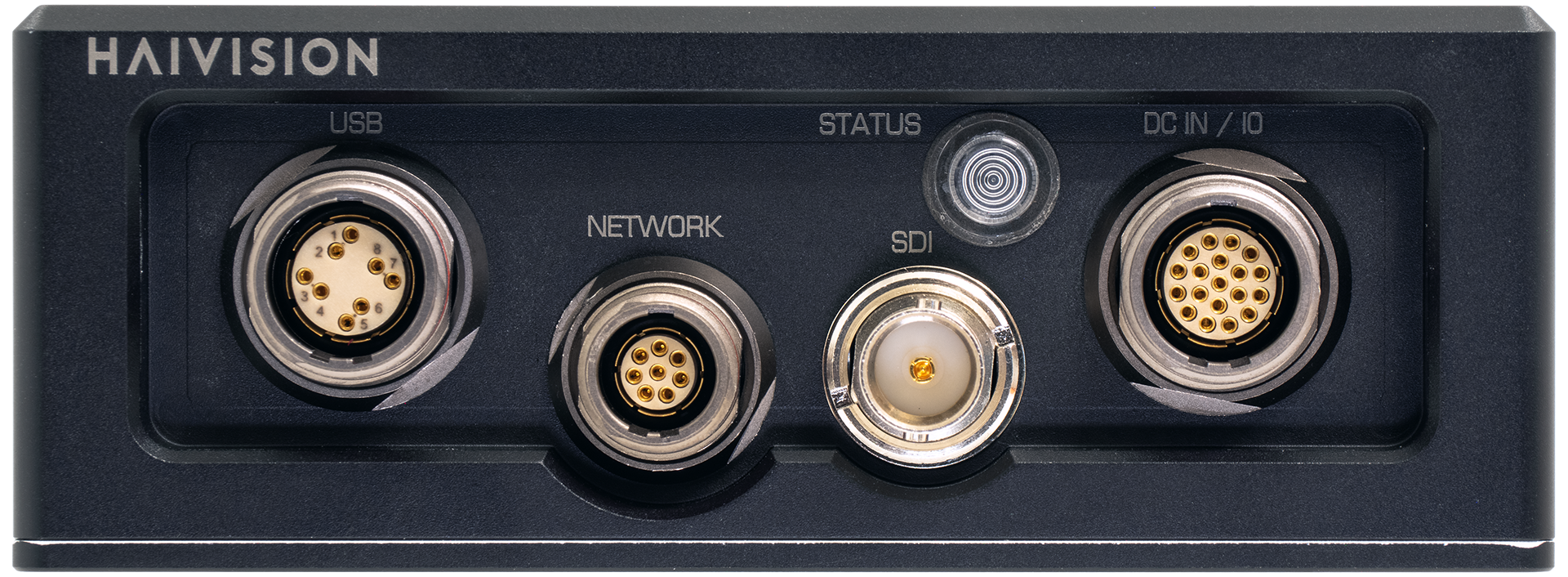
KX1_Front.png

Connectors

Connector

Description

Number of Contacts

DC IN and I/O Connector 

LEMO P/N FGP.2M.319.XLCT

19

Video Input Connector

Coax BNC Jack Amphenol P/N 31-70551-12G

1

Network Connector

LEMO P/N FGN.1M.308.XLCT

8

USB Connector

LEMO P/N HEN.2M.514.XLNP

8

LED Status Indicator

Function

Description

Indication

STATUS

Off

No power

Green fast blinking

Reset button is pressed for less than four seconds. If the Reset button is not pressed, there is a power fault.

Green slow blinking

Booting/Initialization

Green solid

Booting/Initialization sequence is complete (No fault/OK).

Orange fast blinking

Reset button is pressed for more than five seconds (Factory Reset enabled).

After Orange fast blinking, the LED turns off, stays off for a while, and then starts Green slow blinking towards the end of the booting up.

JavaScript errors detected

Please note, these errors can depend on your browser setup.

If this problem persists, please contact our support.