
Stream Statistics
The following table lists the Streaming Output statistics:

Tip
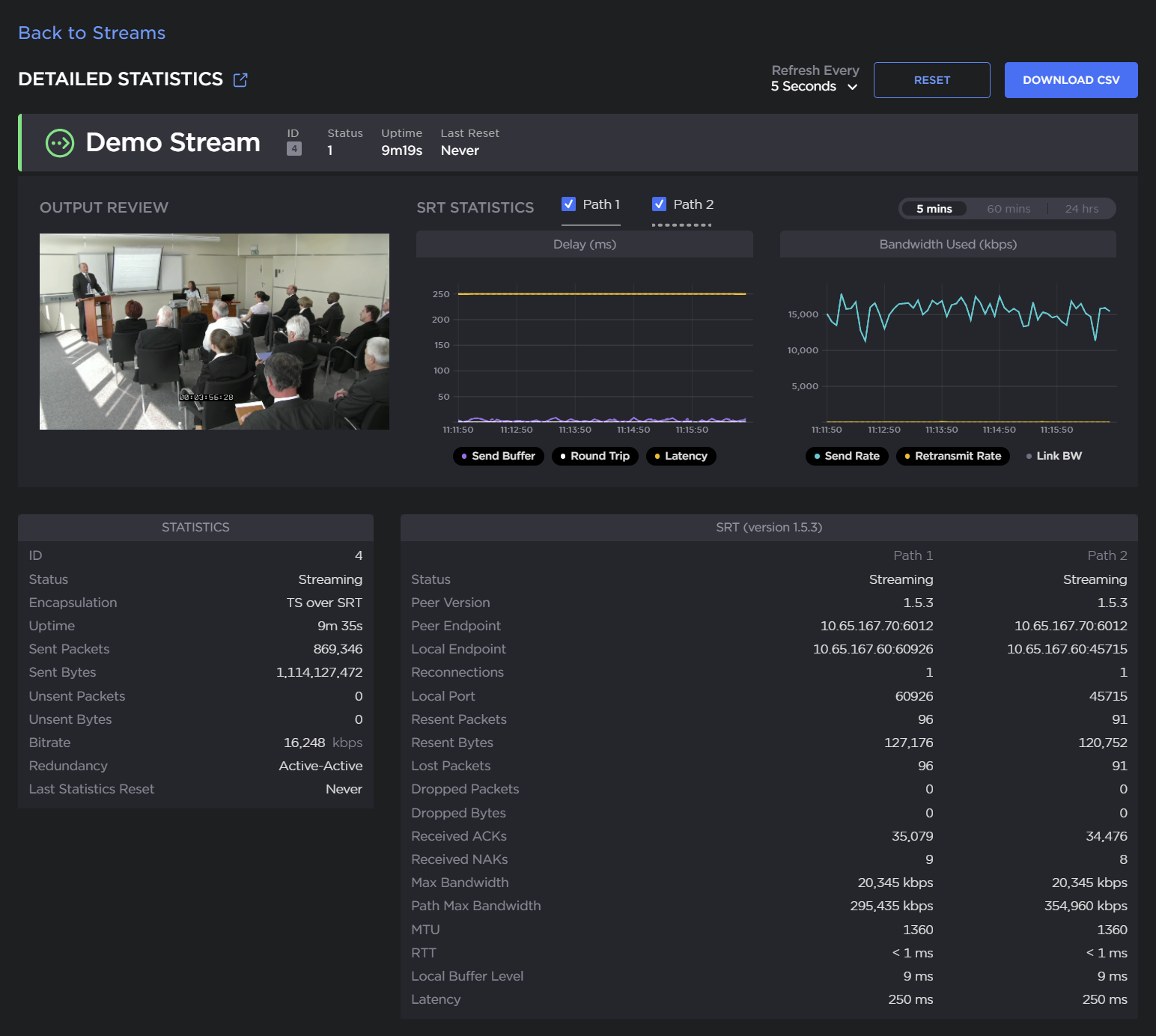
Scroll down to the bottom of the SRT tab for an example of the SRT detailed statistics.
Output Statistic | Description/Values |
|---|---|
State | The current operating status of the stream, either:
For details, see Configuring Streams. |
Up Time | (only available when State is STREAMING) The length of time the stream is actively streaming (e.g., 1d22h5m41s). |
Source Port | The UDP source port for the RTP or UDP stream, i.e., the port from which the encoder is sending the stream. |
Sent Packets | Number of RTP or UDP packets sent for that stream. |
Sent Bytes | Number of Bytes sent for that stream. |
Unsent Packets | Number of RTP or UDP packets not sent for that stream. |
Unsent Bytes | Number of Bytes not sent for that stream. |
Last Error | The last logged error (number and description). |
Occurred | The time at which the last error was logged (i.e., how long ago). |
Bitrate | The stream bitrate (in kbps). |

Note
Click Reset to reset the current output stream statistics.
Click Detailed Statistics to open the detailed output stream statistics page. From here, click Back to Streams to return to the Streams List view.
SRT Statistic | Description/Values |
|---|---|
Path | (Redundant connections only) Descriptive path names (if assigned), or Path 1 and Path 2. |
State | The current operating status of the stream or redundant connections.
See Configuring Streams for further details. |
Peer Version | (Redundant connections only) The SRT version used for the connections. |
Reconnections | The number of reconnections since the stream started. Severe network congestion may cause the connection to drop and automatically reconnect. |
Source Port | The UDP source port for the SRT stream or redundant connections, i.e., the port from which the encoder is sending the stream. |
AES Encryption | Indicates whether Advanced Encryption Standard (AES) encryption has been enabled. |
Key Length | The key length for AES encryption, either: None, AES-128, or AES-256 |
Resent Packets | The number of packets retransmitted following a lost report from the decoder. |
Resent Bytes | Total bytes of the lost packets retransmitted. |
Dropped Packets | The number of dropped packets. |
Dropped Bytes | The number of dropped bytes. |
Received ACKs | Transmission progress acknowledgement and feedback. |
Received NAKs | Lost packet reports. |
Max Bandwidth | Maximum bandwidth (input stream rate * (1 + overhead)). |
Path Max Bandwidth | Estimated link bandwidth. This can change due to cross traffic. |
MTU | (Maximum Transmission Unit) The maximum allowed size of IP packets for the outgoing RTP data stream. |
RTT | Measured Round Trip Time. |
Local Buffer Level | Encoder buffers in milliseconds. SRT encoder buffers are unacknowledged stream packets (reception not confirmed by the receiver/decoder). The encoder buffer in absence of congestion or packet lost is around the RTT value. In presence of recoverable packets lost, the value should be between the RTT and Latency. Encoder buffers above Latency will most probably have an impact on the decoder and affect the user's experience. Tip If the Buffer goes to or above the Latency value often, then there is most likely insufficient bandwidth to support the desired bitrate. In this case, decrease your bitrate. If the Buffer occasionally goes to or above the Latency Value, then the SRT Latency should be increased. |
Latency | Maximum of the decoder and encoder configured in (Buffering) Latency. For example: Encoder Configured SRT Latency = 750 The SRT Stats Latency (which is the current SRT connection applied Buffering Latency) = 750 (largest of the two). At startup, handshake exchanges the value configured on both sides and the largest one is selected. The decoder default is set to the minimum (20ms) so it can be completely controlled from the other side. |
SRT streams include a graphical statistics display as shown in the following example of redundant transport paths:
Note
The Link Bandwidth is an estimate of the actual link bandwidth.
See Configuring SRT Path Redundancy for more on the detailed SRT stream statistics.
Related Topics