
Exploring the Web Interface
After signing in to the Web interface, you will have access to the encoder configuration settings. All of the settings can be adjusted via the Web browser.
The Web interface opens to the Dashboard, as shown in the following example.
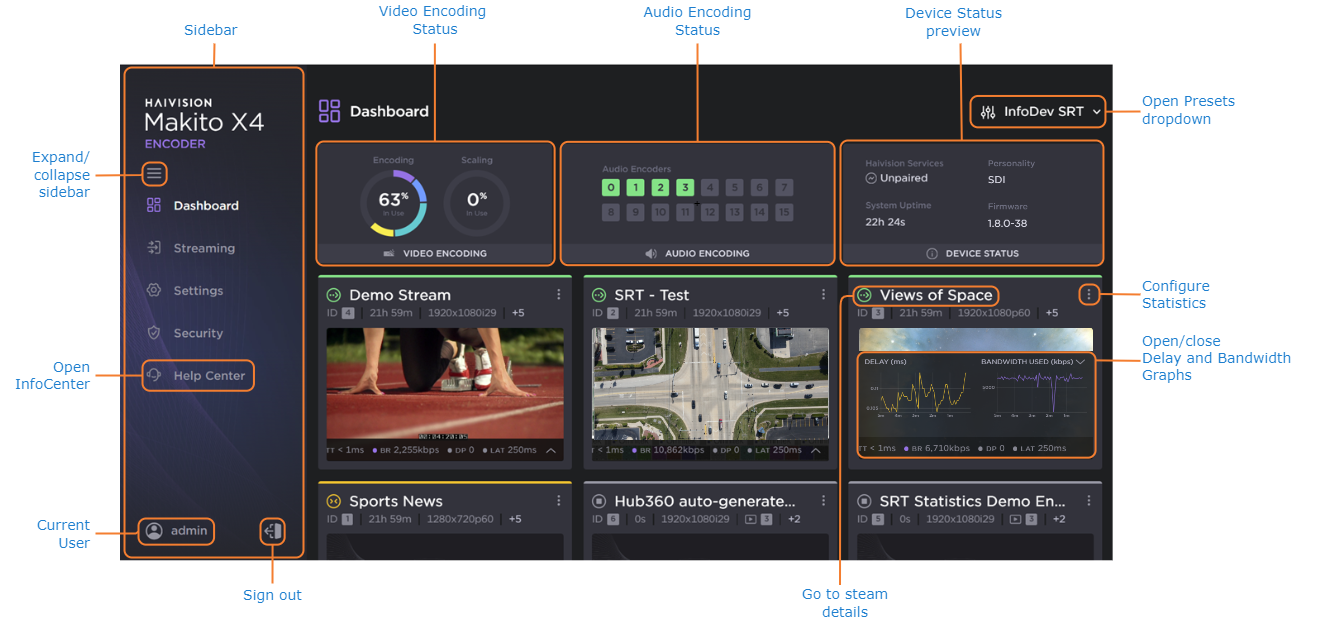
Select Streaming from the sidebar to set up Streams, Video Encoders, Audio Encoders, or Metadata.
Select Settings from the sidebar to:
View the System settings and configure User Preferences
View or Update the Current Software
View or configure the Network settings
View or configure the Date and Time
View or configure Services
Manage Licensing
Select Security from the sidebar to manage:
Select Help Center from the sidebar to access online Help. You will be re-directed to the Haivision InfoCenter website, which contains the MFX documentation. See How to use the InfoCenter for tips and tricks for browsing the site.

Note
If no external internet connection is available, a Local Help for the Makito X4 Encoder is opened in your Web browser.