
Version History
This page consolidates the version history for each previous Hub 360 release.
On this page:
Hub 360 1.11
TBD
TBD |
|
Hub 360 1.10
Added SIM Management Feature
On the Cellular Data screen, added a SIM Management tab to allow admins to manage the SIM cards within your organization. Note Currently, only Webbing SIMs are supported. Support for TEAL SIMs is scheduled for version 1.11. |
|

Added Filtering Option on Cellular Data’s Consumption Tab
On the Cellular Data’s Consumption tab, added the Transmitters dropdown to assist with filtering the list. |
|
Added Networks Information Panel for Transmitters
On the Appliances screen, for transmitters (Air, Pro, Rack, and Falkon) added a Networks panel that shows a list of all network connections for the transmitter (i.e., Ethernet, WiFi, cellular modem, and Bluetooth). Note Currently, only Webbing SIMs are supported. Support for TEAL SIMs is scheduled for version 1.11. |
|
External Source and Destination FQDN Support
Added support for fully qualified domain names (FQDN) when adding a stream to an external source and destination. |
|
Improved Handling of Live Transmissions in Master Control
In previous versions, if a transmission is live a new source cannot be changed on the receiver without first stopping the source. Now, you may change the receiver’s source via drag-and-drop or selecting a new source in the dropdown. A warning dialog appears to confirm the change: 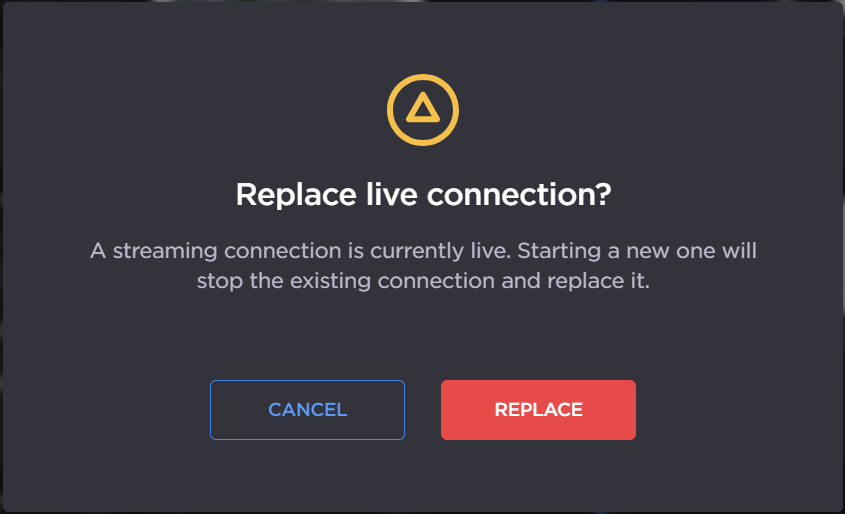 Replace Live Connection |
|
New Activity Feed Entries
Added new activity feed entries for SIM card status and Makito configuration and streams. |
|
MoJoPro Devices No Longer Count as a Paired Appliance
When MoJoPro devices connect to your Hub 360 organization, they no longer count against the number of paired appliances in your license. |
|
Hub 360 1.9
Appliance Labels
You can now add labels to your appliances, making it easier to view and organize large numbers of appliances across the Appliances and Master Control screens. |
|
Makito X Encoder and Decoder Available in Master Control
You can now create SRT routes using your connected Makito X Encoders and Decoders and monitor their route telemetry on the Master Control screen. Note Thumbnail previews are not supported by the Makito X Encoders and Decoders. |
|
SSH Tunneling with Makito X Encoder and Decoder 2.6
With the release of version 2.6, Makito X Encoders and Decoders support SSH Tunneling via Hub 360. Now you can access these devices directly from Hub 360 without remembering their logins and passwords. |
|
Hub 360 Subscription Information
For admins, your subscription details are now available to view on the Admin Area > Licensing page. |
|
Rename Transmitters and MoJoPro Devices
Added ability to change the name of the transmitters and MoJoPro devices within the Appliances > Settings pane. |
|
Creating and Editing Makito Streams
Added ability to add and edit the individual SRT streams on your connected Makito Encoders and Decoders. Note Non-SRT streams created directly on the Makito Encoder or Decoder cannot be edited via Hub 360. |
|
Editing Makito Decoder Cores
You can now edit the assigned streams and SDI outputs for each Makito decoder core. |
|
Makito SSH Tunnel Timeout Increased
The SSH tunnel connection timeout for Makito devices has been extended to 25 minutes, ensuring you have adequate time to complete tasks without premature disconnection. |
|
Hub 360 1.8
New Cellular Data Consumption Screen
You can now view the data usage of all installed SIM cards across your connected transmitters. The new screen includes flexible filters, allowing you to customize the view to match your needs. |
|
Self-Service StreamHub Pairing and Removal
You can now add and delete your StreamHubs to your Hub 360 organization without contacting Haivision Support. |
|
Editing Makito Encoder Settings and Saving Profiles
Added ability to edit the current settings of a Makito video/audio encoder and save the settings as a profile. You can then apply that profile to other similar Makito models. |
|
Support Access to Subscription
Added option to allow or deny Haivision support access to your Hub 360 subscription. |
|
Recording and File Forward Status Icons
In the Master Control screen, the transmitter source tiles now show status icons |
|


Improved Support for SRT Gateway
With the release of Haivision SRT Gateway 4.1, you can now upgrade the Gateway firmware and connect to the Gateway via an SSH tunnel. |
|
Hub 360 1.7
Makito Encoder Profiles
Added the ability to configure Makito audio and video encoder cores using a new Templates & Profiles screen. Note The ability to save the current encoder configuration will be available in a future Hub 360 release. |
|
Added StreamHub Telemetry View in Master Control
Clicking the |
|

Falkon X2 Support
Added support for the upcoming Falkon X2 5G mobile video transmitter. |
|
Support for Data Bridge Mode in Transmitters and StreamHubs
Added support for paired transmitters and StreamHubs in data bridge mode. On the Master Control screen a Note Configuring and enabling data bridge mode must be completed within the transmitter interface. |
|

Ability to Reserve StreamHub Inputs for Lives Versus File Forwards
For StreamHubs (cloud and on-premise), you can now configure the number of inputs you wish to reserve for lives and file forwards. By default, all inputs could be used either for live or file forward. |
|
Custom Streaming Addresses and Ports per Makito Decoder Core
For Makito Decoders, added ability to specify a streaming address and port per video decoder core. |
|
Improved Telemetry for Field Unit and MoJoPro Sources in the Master Control Screen
In the Master Control screen:
|
|
Authentication via Single Sign-On (SSO)
Support for SSO with identity providers compatible with SAML 2.0 has been added. Please contact your Haivision sales representative to activate and set up this feature. | N/A |
Last Known Geographic Location for Air, Pro, MojoPro Devices
When Geolocation is enabled, the Appliances screen reports the last known location for offline transmitter and MojoPro devices. When administrators disable geolocation for their organization, all last known location information is deleted. |
|
StreamHub Description Field
Added editable description field for StreamHub appliances. |
|
Hub 360 1.6.1
Makito Decoders: Display and Start/Stop Streams and Decoders
For your connected Makito Decoders you can now view and control the configured video decoders and streams on the Appliances screen. |
|
SRT Gateway Network Bandwidth Display
Added input/output network bandwidth in the SRT Gateway listing in the Appliances screen. |
|
Dismissing Appliance Warning Messages
Successful appliance reboot messages can now be dismissed in the Appliances screen. | N/A |
Web Interface Brightness and Contrast Control
Added ability to customize the brightness and contrast of the web interface. Note The brightness and contrast settings are stored in your browser and do not persist across other browsers nor devices. |
|
Updated Accepting an Invitation Workflow
Updated steps involved with accepting an invitation for new users. |
|
StreamHub Status when Master Control Disabled
The current status of StreamHubs and Cloud StreamHubs in the Appliances screen is still reflected when Master Control is disabled on these devices. |
|
Hub 360 1.6
Hub 360 1.5
Initial SRT Gateway Support
SRT Gateway devices can now be paired to Hub 360. However, only limited functions are available. Full support for SRT Gateway will be available in a future release. |
|
External Sources and Destinations
If your device is not yet supported in Hub 360, you may add an external source or destination and populate pre-existing SRT streams within these devices. You can then use these streams in the Master Control screen to create routes. See the following note for limitations. Note
|
|
Booking by StreamHub Priority
Added ability to prioritize StreamHubs within groups for auto-generated routes from transmitters or MoJoPro devices. |
|
Makito FX Encoder Support in Master Control
With the release of Makito FX Encoder 1.1, these encoders are now fully integrated with Hub 360. You can create and edit streams using them in the Master Control screen, and you may initiate an SSH tunnel to interact directly with the encoder's interface. |
|
Remote Connection to StreamHub using Domain Name
In the StreamHub appliance settings, added an Interface Address textbox, allowing you to specify a custom address or domain name for appliance interface access. This address or domain is used when accessing the appliance interface via Hub 360. |
|
Streaming Address for Makito Decoders
You can now configure a streaming IP address or domain for your paired Makito Decoders. If configured, this address will be used to connect to the decoder for video transmissions. |
|
Improved Performance of Renaming Makito Devices
Whether you rename your Makito devices in the Hub 360 interface or in the individual Makito web interfaces, both will now stay in sync. | N/A |
Hub 360 1.4
Hub 360 1.3.3
Hub 360 1.3.2
Hotfix release only.
Hub 360 1.3.1
Hotfix release only.
Hub 360 1.3
Hub 360 1.2
Hub 360 1.1
Initial public release