
Starting a Live
From the Home menu, tap on
 .
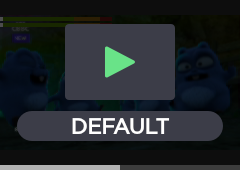
.
Tap on
 to go to the live configuration.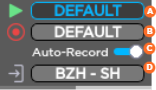
 Selected live profile
 Selected record profile
 Auto-record (on/off)
 Selected destination profile
Tap on
 and on
  to start a Live.
Tap on
for more indications, some are displayed as follows: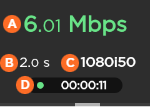 Network bitrate End-to-end Latency Source Standard Duration of Live

Note
When Auto-record is enabled, click on the screen to have additional indications:
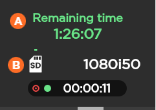
Remaining recording time possible on SD card Space used on SD card
See Connection Loss during a Live with Simultaneous Record for information on device behavior during a network connection loss.