Bitrate Fluctuation and Latency Impact on Stream Transmission
This page explains how bitrate fluctuations and transmission issues can be mitigated by increasing latency, especially for long-distance transmissions or degraded local connectivity, and how latency adjustments can also be made live in Hub 360 Master Control.

Problem: Bitrate is fluctuating, and/or the transmission is taking hits.
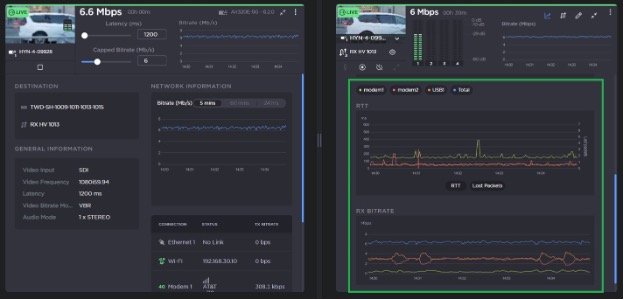
The screenshot at right is from a StreamHub server in France connected to an AIR transmitter in Texas transmitting over less-than-pristine local cell and Ethernet connections. It shows the following:
The bitrate fluctuates with 1.2 s latency.
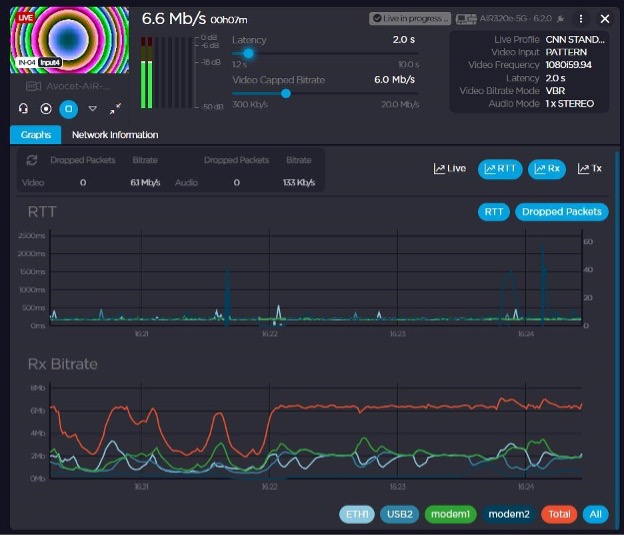
There is increased latency at 16:22 from 1.2 s to 2.0 s.
The bitrate stabilized and later rode out RTT spikes and dropped network packets on modem 2 at 16:24.
If there’s insufficient latency, then any RTT or dropped packets (top graph) can impact the stream bitrate (bottom graph):
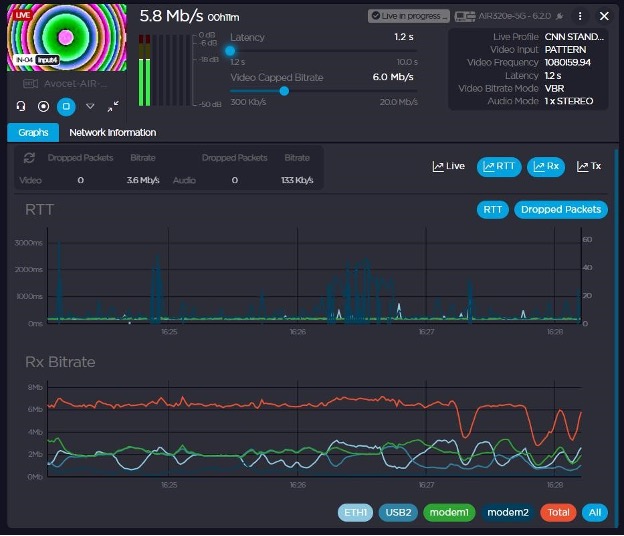
Modem 2 continued to struggle, but the latency allowed the stream to continue unaffected. Latency dropped back to 1.2 s at 16:27. Bitrate started fluctuating again:
Here are some tips on how to deal with similar situations:
When transmitting a stream over a long distance, or when encountering degraded local connectivity, more latency may be necessary.
Latency can be adjusted while live, without stopping the stream. Note that you cannot adjust latency below the starting latency, but you can go up to and back down from 10 seconds.
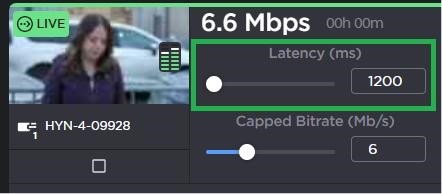
Latency can be adjusted on-the-fly in Hub 360 Master Control.
The graphs on this page are from the StreamHub’s UI, but similar graphs can be found in Hub 360 Master Control: