Creating Groups
Groups are fundamentals to monitor and control an ecosystem through the Manager.
A group includes:
products (field units and receivers)
receivers' outputs

Note
A default group called "Aviwest" has the following credentials:
Username: username
Password: password
Only the administrator can create groups. This default group cannot be deleted.
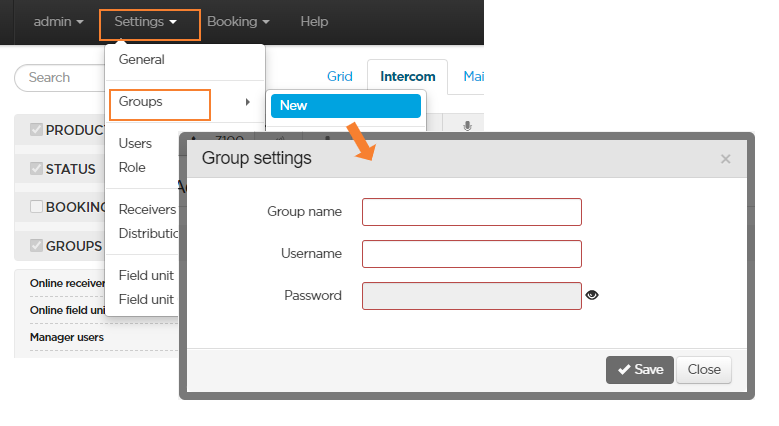
To create a new group:
In the menu bar, click Settings.
In the Groups section, click New.
Enter a Name for the new group. The name must include 3 to 20 characters, letters and digits (special characters are not allowed except underscore and hyphen).
Enter a Username and a Password. The username and password must include 6 to 20 characters, letters and digits (space and special characters are not allowed except underscore). Use a unique name and username for each group.
Click the Save button.
Note
Once a group is created, receivers can be assigned to it, when adding them to the ecosystem (see chapter Adding Receivers).