
Storage Mezzanine LED Status Indicators
The Makito X Storage Mezzanine LEDs are shown following.
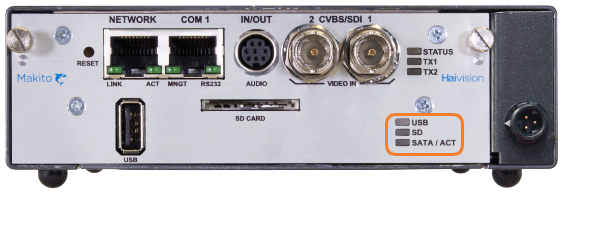
Fixed mSATA SSD LEDs
Description | Indication |
|---|---|
USB | |
Off | LED remains off until drive has booted. |
Green solid | Indicates drive is ready to use. |
SD | |
Off | LED remains off until drive has booted. |
Green solid | Indicates drive is ready to use. |
SATA/ACT | |
Off | LED remains off until drive has booted. |
Green solid | Indicates drive is ready to use. |
Green blinking | SATA LED blinks briefly off when the SATA drive is being accessed. |
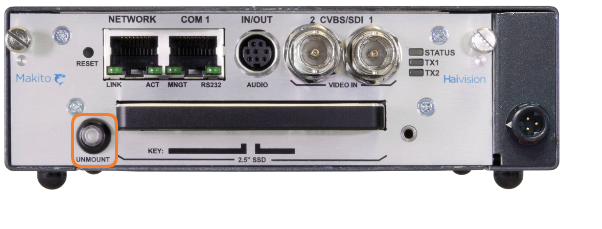
Removable SATA SSD LEDs
Description | Indication |
|---|---|
Mount Status LED/Unmount Button | |
Off | SSD not mounted. |
Blue solid | SSD mounted and ready to use. |
Blue blinking | Blinks briefly off when the SATA drive is being accessed. |
Blue blinking two times per second | Slow flash occurs when Unmount button is pushed. Blinking then stops, indicating that drive is unmounted and can be removed. Note To unmount SATA drive, press the Unmount button for three seconds. |

Related Topics