Starting and Stopping an Input or Output
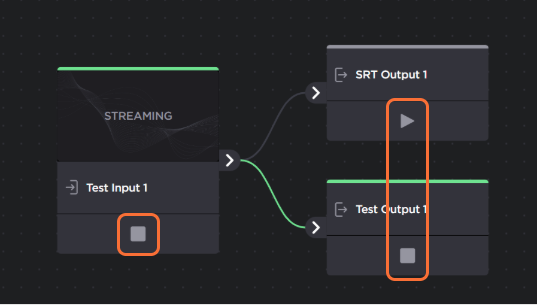
You may start or stop an input/output on either the Route List screen or the Route Editor:

Note
Stopping an input also stops the outputs associated with the route.
In the sidebar, click
 Streaming.
Find route whose input or output you would like to start or stop.
To start/stop an input, click the
 or
or  icon in the route to start or stop the input. This also starts/stops the outputs within the route.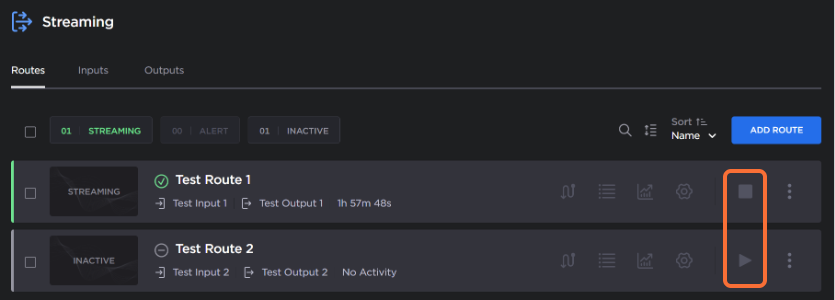
To start/stop an output:
Show the route’s input and outputs by clicking the
 icon.
icon.Click the
or icon to start or stop the output, respectively.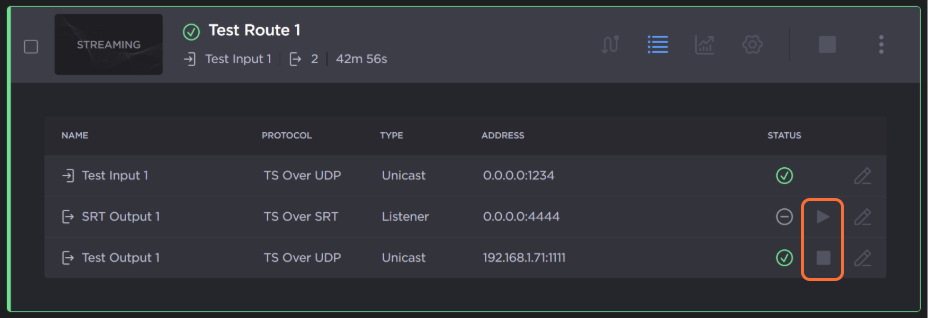
In the sidebar, click
Streaming.Find route whose input or output you would like to start or stop.
Open the Route Editor by clicking
 icon.
icon.Find the input or output you want to start/stop, and click either the
or icon to start or stop the input or output, respectively. Stopping the input also stops the connected outputs.