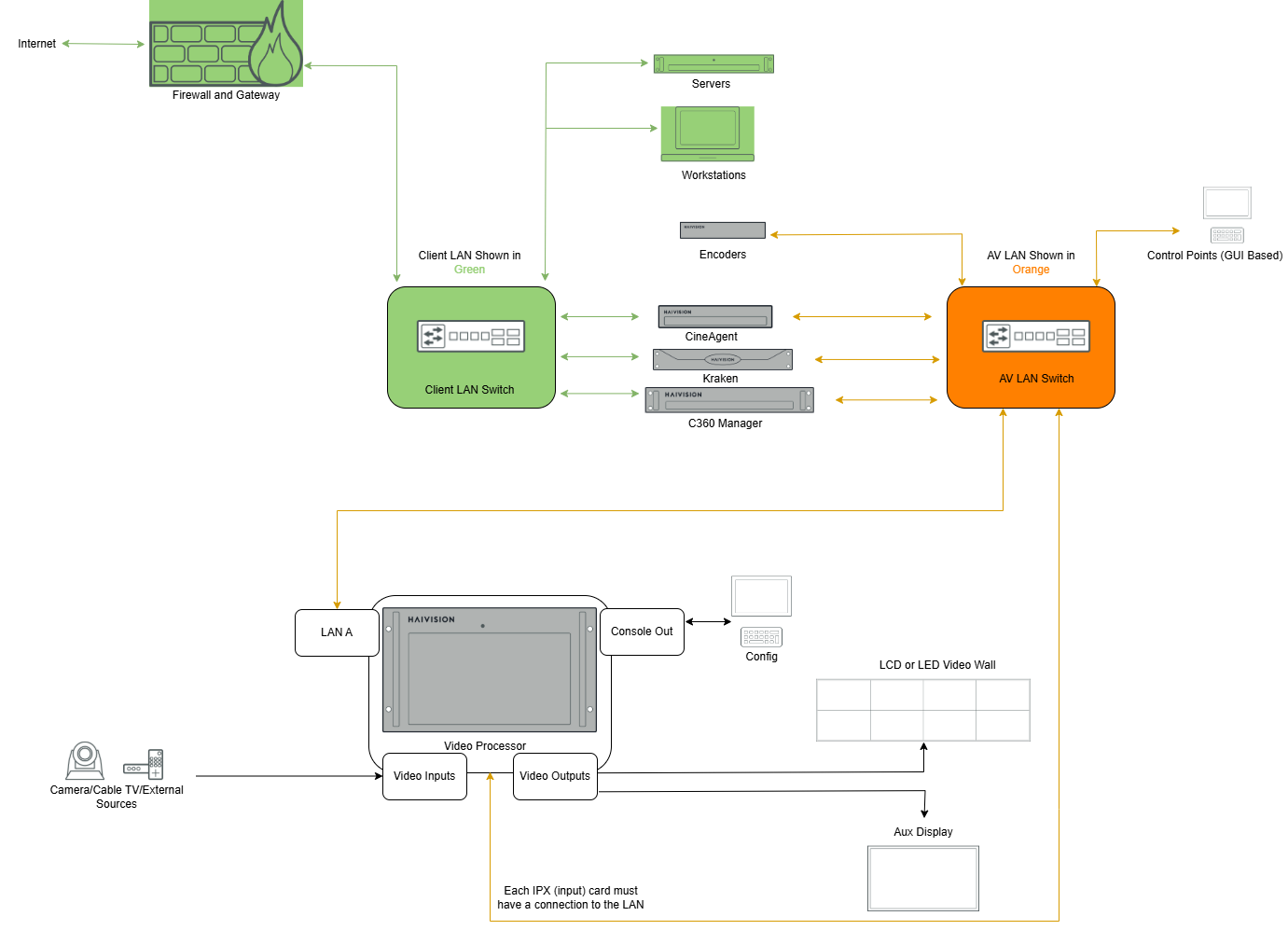
Dual NIC Enterprise Network
In a dual-NIC implementation, each device uses two physically separate network connections:
AV LAN for real-time traffic
Enterprise VLAN for UI and internet access, updates, and remote support
These networks remain logically and physically separated.
Advantages
AV LAN handles all real-time video traffic — tuned for low latency and high performance
Enterprise IT policy changes do not disrupt real-time video traffic
Keeps IT policies and policy changes from disrupting real-time video traffic
Command 360 bridges secure AV operations with enterprise functions
Enterprise VLAN handles UI access, authentication, updates, remote support, and SSO
Disadvantages
Requires additional switch ports, cabling, and coordination with IT department
The illustration below includes some optional components that are not exclusive to dual-NIC topology:
CineAgent appliances for controlled web access
Kraken for stream transcoding and interoperability with diverse encoders/decoders
Command 360 Manager for centralized user permissions, content management, and navigation