
Displays
Displays are the virtual representation of the physical panels on which video wall content appears. Add, view, and manage displays from the Displays page of the Admin interface.
To access the Displays page:
Click the user icon in the top right corner and select Admin.
On the side menu, click Rooms.
Click a room name from the summary table or on the side menu.
Under Resources, click the icon on the Displays resource.
You are taken to the Displays page, shown below:
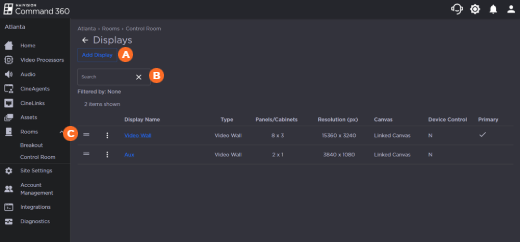
Features of the Displays page appear above and include:


Maximum Number of Displays
There is no limit on the number of displays that may be created per video processor. However, only up to 10 displays in the Activity Interface will have Live View available to them. The specific number of displays you can create is determined by how the associated canvas was configured.
Display Orientation
Landscape-oriented displays are the most common and strongly recommended configuration for optimal video wall operation. In rare cases, portrait-oriented visualization is preferred, but note that this is not an easily altered feature. Instructions for configuring both landscape- and portrait-oriented displays are included for general reference, and not intended to be implemented after initial installation.

Caution
Attempting to change the display orientation after system deployment can cause significant performance issues and may require re-installation.